|
Real equipment. How to do it?
|
| Emmelie_Star27 |
Posted on 12-07-2014 12:15
|

Amateur

Posts: 10
Joined: 08-06-2014
PCM$: 200.00
|
So I don't know why but I can't stand to see the Cyanide equipment, so I tried to make my own.
Well, the let's just say that it didn't go so good.
(The frames aren't made by myself. It was in one of the databases that i tried)
Making the wheels didn't seem as complicated as making frames, but apprently it is. |
| |
|
|
| ejorgensen |
Posted on 12-07-2014 12:18
|
Junior Rider
Posts: 42
Joined: 08-01-2012
PCM$: 200.00
|
Try the FocusDB 1.5, there is real wheels in also 
|
| |
|
|
| ejorgensen |
Posted on 12-07-2014 12:18
|
Junior Rider
Posts: 42
Joined: 08-01-2012
PCM$: 200.00
|
Try the FocusDB 1.5, there is real wheels in also
|
| |
|
|
| KenL |
Posted on 13-07-2014 00:44
|

Stagiare

Posts: 226
Joined: 05-11-2007
PCM$: 200.00
|
Glad to see you are trying to make some new equipment.
I have been making the equipment that is the basis for most of the databases since 2007, so I am sure we can find the problem.
Upload your _d and _s.dds files and the png file you were editing so we can check for immediate issues.
At first glance, it looks like your teams Auto-colouring might be set to white and the _s file transparency is solid and not transluscent.
As ejorgensen said, you could just download a database and use one of their wheels...but it is better to learn how to make your own. |
| |
|
|
| Emmelie_Star27 |
Posted on 13-07-2014 01:07
|
Amateur
Posts: 10
Joined: 08-06-2014
PCM$: 200.00
|
ejorgensen wrote:
Try the FocusDB 1.5, there is real wheels in also
It works great, thanks. But i also want to try to make my own equipment. And possible make fantasy equipment. |
| |
|
|
| Ad Bot |
Posted on 29-04-2026 18:01
|
Bot Agent
Posts: Countless
Joined: 23.11.09
|
|
| IP: None |
|
|
| Emmelie_Star27 |
Posted on 13-07-2014 01:27
|
Amateur
Posts: 10
Joined: 08-06-2014
PCM$: 200.00
|
KenL wrote:
Glad to see you are trying to make some new equipment.
I have been making the equipment that is the basis for most of the databases since 2007, so I am sure we can find the problem.
Upload your _d and _s.dds files and the png file you were editing so we can check for immediate issues.
At first glance, it looks like your teams Auto-colouring might be set to white and the _s file transparency is solid and not transluscent.
As ejorgensen said, you could just download a database and use one of their wheels...but it is better to learn how to make your own.
I forgot to save them separately, as they got overwritten by FocusDB wheels. But also seem to have messed up something in my photoshop so I can't seem to open/edit .dds files anymore. And I can't find the Nvidia DDS thing i used.
Do you have some tricks and some tools that make equipment easier. and the .NIF do also need to edit in that?
Edit: I figured it out with the .DDS Nvidia, i launched the wrong Photoshop
Edited by Emmelie_Star27 on 13-07-2014 01:29
|
| |
|
|
| KenL |
Posted on 13-07-2014 02:21
|
Stagiare
Posts: 226
Joined: 05-11-2007
PCM$: 200.00
|
In the nif file there is 3 files with a purple flower symbol, for wheels they are around line 41-43 which connect the dds files to the nif. Right-click on the _d, _n and _s files then follow texture and choose. Direct them to your files.
Having said that, as long as you name them the same _d, _n and _s and enter them exactly the same in your database they should work.
If you made a mistake in the _d file you created your wheels usually fail to show up at all. Seeing as you have wheels in the correct form but not the colour you painted, it is probably the _s file.
Upload your files and I can look them over for you.
|
| |
|
|
| Emmelie_Star27 |
Posted on 13-07-2014 03:25
|
Amateur
Posts: 10
Joined: 08-06-2014
PCM$: 200.00
|
KenL wrote:
In the nif file there is 3 files with a purple flower symbol, for wheels they are around line 41-43 which connect the dds files to the nif. Right-click on the _d, _n and _s files then follow texture and choose. Direct them to your files.
Having said that, as long as you name them the same _d, _n and _s and enter them exactly the same in your database they should work.
If you made a mistake in the _d file you created your wheels usually fail to show up at all. Seeing as you have wheels in the correct form but not the colour you painted, it is probably the _s file.
Upload your files and I can look them over for you.
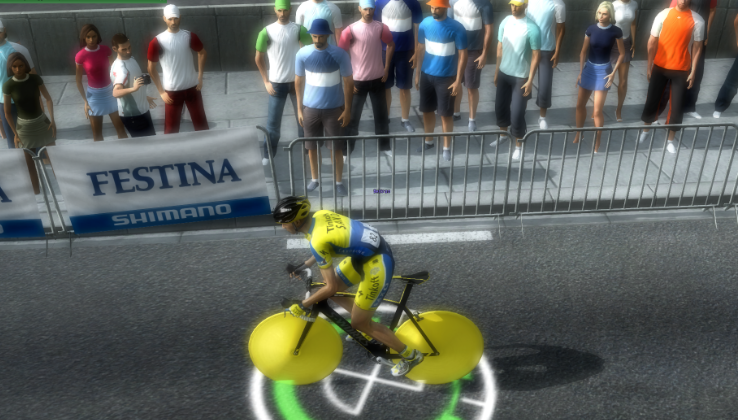
"nif 3 files, line 41-43" How can i open the .NIF file?
_d file looks normal and easy to make.
but with _n and _s not so easy. I don't know.
I kinda know what i'm doing in PS but at same time not really.
|
| |
|
|
| lluuiiggii |
Posted on 13-07-2014 03:37
|
Grand Tour Champion

Posts: 8425
Joined: 30-07-2010
PCM$: 200.00
|
You can open .nif files in NifSkope. As for the problem in your wheel, with this second screen it is indeed the problem that KenL mentioned - see how the whole wheel gets yellow, that's because yellow is the color of Tinkoff Saxo and the _s file is set to put autocolor color on the whole wheel. To change the autocolor, you need to edit the alpha channel of the _s file (white means that place will be autocolored, black/gray means no autocolor - take a look at some frames/helmets, that should be clear ). To fix your problem, either change the autocolor of the _s file of your wheel or, probably easier, copy the _s file of the wheel you've used as 'base' 
|
| |
|
|
| Emmelie_Star27 |
Posted on 13-07-2014 04:17
|
Amateur
Posts: 10
Joined: 08-06-2014
PCM$: 200.00
|
lluuiiggii wrote:
You can open .nif files in NifSkope. As for the problem in your wheel, with this second screen it is indeed the problem that KenL mentioned - see how the whole wheel gets yellow, that's because yellow is the color of Tinkoff Saxo and the _s file is set to put autocolor color on the whole wheel. To change the autocolor, you need to edit the alpha channel of the _s file (white means that place will be autocolored, black/gray means no autocolor - take a look at some frames/helmets, that should be clear ). To fix your problem, either change the autocolor of the _s file of your wheel or, probably easier, copy the _s file of the wheel you've used as 'base'
NOW I'M LOST, completely lost.
OK so i tried a few things. I don't know what I did wrong but you guys can properly spot it.
So i tried just taking a wheel from another database a just a H on the left and emmelie on the right side of the wheel. Did touch _s or _n, only the _d.
Same results (also added a Contador bike):
This is the wheel (_d):
^ that was only thing i touched on the original files wheel_astana_aero
_s:
^ That _s file is from a working wheel.
_n:
|
| |
|
|
| lluuiiggii |
Posted on 13-07-2014 07:06
|
Grand Tour Champion
Posts: 8425
Joined: 30-07-2010
PCM$: 200.00
|
I see that you have two layers in the Photoshop screen containing the graphics of the _s and _n file - did you re-save them? If yes, as I said, you need to check the Alpha channel of the _s file In the box of the layers in Photoshop, there's three tabs: on the middle one (Channels) there should be the Alpha Channel (if it isn't there click on the button to create a new layer while in the Channels tab, then it should appear). Try copying/renaming the _s.dds file, not copying it in Photoshop and resaving (I'm assuming that you've done that, if not then the problem might be something else but I still think it's what KenL said  ). ).
|
| |
|
|
| KenL |
Posted on 13-07-2014 07:08
|
Stagiare
Posts: 226
Joined: 05-11-2007
PCM$: 200.00
|
Your _s file has no translucency.
Rename the one I sent you and try it out.
https://www.media...7br9vbpb8z
Edited by KenL on 13-07-2014 07:11
|
| |
|
|
| ozzie68 |
Posted on 13-07-2014 07:15
|
Stagiare
Posts: 168
Joined: 18-05-2007
PCM$: 200.00
|
The n file looks like its for a Disc, not for a road wheel, Its solid and has no detail i.e spokes as road wheel n file has detail.
As KenL pointed out. The s file is transparent. |
| |
|
|
| KenL |
Posted on 13-07-2014 07:41
|
Stagiare
Posts: 226
Joined: 05-11-2007
PCM$: 200.00
|
Ozzie is correct about the _n file.
Here is a pack with the files needed to create road and tt wheels.
Download: https://www.media...5lpsjbiz5q
Essentially you make your _d file to your liking for either a road or TT wheel, then just rename the appropriate _n and _s files to the same as what you named your _d file.
With these _n and _s files you never have to actually open then for editing.
The _n file is simply a normal map and adds barely visible shadows to your wheel ingame. But having the disc for your front wheels may cast a weird shadow in close-ups. And vise-verse.
The _s file is a secular map and is used for adding Auto-colouring in PCM. Unless you wish to have something show up with the team colour on the wheel, it can be left alone. You mostly see the _s file used for creating generic brand helmets and frames in a teams main colour, such as those made for the PCMdaily expansion packs. (Which most databases are based on). |
| |
|
|
| VoetsT |
Posted on 13-07-2014 09:32
|
Breakaway Specialist

Posts: 847
Joined: 29-06-2013
PCM$: 200.00
|
I'm also very interested in making my own (real) equipment. But it seems that I can't open the _d, _n, _s files with photoshop. I always get this message: "Could not complete your request because it is not the right kind of document".
I'm a complete noob to this equipment making subject. So can someone explain the basics of editing wheels (and maybe frames)?
Thanks in advance
|
| |
|
|
| Emmelie_Star27 |
Posted on 13-07-2014 11:49
|
Amateur
Posts: 10
Joined: 08-06-2014
PCM$: 200.00
|
VoetsT wrote:
I'm also very interested in making my own (real) equipment. But it seems that I can't open the _d, _n, _s files with photoshop. I always get this message: "Could not complete your request because it is not the right kind of document".
I'm a complete noob to this equipment making subject. So can someone explain the basics of editing wheels (and maybe frames)?
Thanks in advance
Here, this my help you out.
https://developer.nvidia.com/nvidia-t...-photoshop
|
| |
|
|
| Emmelie_Star27 |
Posted on 13-07-2014 12:15
|
Amateur
Posts: 10
Joined: 08-06-2014
PCM$: 200.00
|
lluuiiggii wrote:
I see that you have two layers in the Photoshop screen containing the graphics of the _s and _n file - did you re-save them? If yes, as I said, you need to check the Alpha channel of the _s file In the box of the layers in Photoshop, there's three tabs: on the middle one (Channels) there should be the Alpha Channel (if it isn't there click on the button to create a new layer while in the Channels tab, then it should appear). Try copying/renaming the _s.dds file, not copying it in Photoshop and resaving (I'm assuming that you've done that, if not then the problem might be something else but I still think it's what KenL said ).
I don't know:
But making progress:
|
| |
|
|
| Emmelie_Star27 |
Posted on 13-07-2014 12:20
|
Amateur
Posts: 10
Joined: 08-06-2014
PCM$: 200.00
|
KenL wrote:
Ozzie is correct about the _n file.
Here is a pack with the files needed to create road and tt wheels.
Download: https://www.media...5lpsjbiz5q
Essentially you make your _d file to your liking for either a road or TT wheel, then just rename the appropriate _n and _s files to the same as what you named your _d file.
With these _n and _s files you never have to actually open then for editing.
The _n file is simply a normal map and adds barely visible shadows to your wheel ingame. But having the disc for your front wheels may cast a weird shadow in close-ups. And vise-verse.
The _s file is a secular map and is used for adding Auto-colouring in PCM. Unless you wish to have something show up with the team colour on the wheel, it can be left alone. You mostly see the _s file used for creating generic brand helmets and frames in a teams main colour, such as those made for the PCMdaily expansion packs. (Which most databases are based on).
So i downloaded your pack, and didn't touch _n and _s. Added a small change to _d file. Still the same thing, just not a disk but a completely yellow wheel, that look like a normal RR wheel (Tinkoff - Saxo)
|
| |
|
|
| Emmelie_Star27 |
Posted on 13-07-2014 12:33
|
Amateur
Posts: 10
Joined: 08-06-2014
PCM$: 200.00
|
FINALLY!!!!!
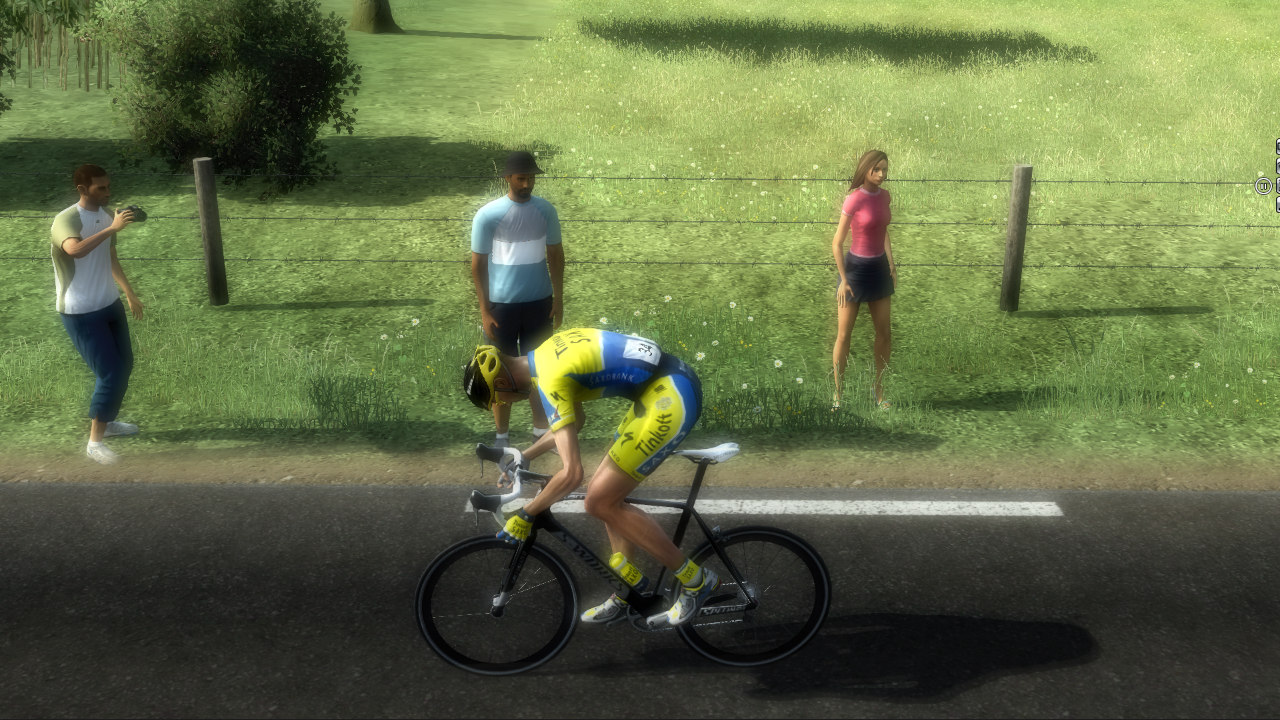
Thank you for the help!
Didn't touch the _s and _n but added a completely new document with the d and i forgot to put the small change to it, but I doesn't matter! I'm happy
|
| |
|
|
| VoetsT |
Posted on 13-07-2014 13:10
|
Breakaway Specialist
Posts: 847
Joined: 29-06-2013
PCM$: 200.00
|
I have edited a _d file and rename the .nif, _n and _s files. Is this correct and how do I get this in a (PCM 2013) database?
(Never done that before.)
|
| |
|