|
Save files are gone
|
| Mansie92 |
Posted on 27-06-2016 00:46
|
Amateur

Posts: 10
Joined: 20-06-2016
PCM$: 200.00
|
Hey guys,
Most of the time I play the Pro Cyclist mode in PCM2016.
In the past few days it happened twice to me that game crashed or getting stucked while moving forward to a new day. In fact: I had to restart my laptop because really nothing was working (CTRL + Alt + DEL or Alt + Tab for example).
After I rebooted my laptop I can't load the last game... So I had to restart my career twice from the beginning. Is there anything I can do to back-up my savegames properly so I can load it back in the gamefolder?
Hope you guys can help me!
Greetings,
Mansie 92 |
| |
|
|
| matt17br |
Posted on 27-06-2016 00:51
|

Directeur Sportif

Posts: 10519
Joined: 28-09-2013
PCM$: 200.00
|
The weeklysaves folder saves a backup of your savegame each week.
|
| |
|
|
| Mansie92 |
Posted on 27-06-2016 11:48
|
Amateur
Posts: 10
Joined: 20-06-2016
PCM$: 200.00
|
matt17br wrote:
The weeklysaves folder saves a backup of your savegame each week.
The files are already in that weeklysaves folder, but when I start the game I can't find that particular savegame in the loading screen.
Where do I have to put that savefile to make it back work again?
I use Steam btw!
Edited by Mansie92 on 27-06-2016 12:12
|
| |
|
|
| Lachi |
Posted on 27-06-2016 12:52
|

Grand Tour Champion

Posts: 8360
Joined: 29-06-2007
PCM$: 200.00
|
You misunderstood. The files in the weeklysave folder are the weekly backups of your saves.
You can copy one of those to your save game Folder. The date in the file name indicates the date of the career.
The save game folder is here: cloud\your name |
| |
|
|
| Mansie92 |
Posted on 27-06-2016 14:03
|
Amateur
Posts: 10
Joined: 20-06-2016
PCM$: 200.00
|
If I put that particular saved file in the cloud\your name folder, I can start the game. But when I press load nothing happens and the game crashes.
Sorry for being such a noob, but what can I do to fix this? |
| |
|
|
| haasje33 |
Posted on 27-06-2016 14:15
|

Sprinter

Posts: 1677
Joined: 08-08-2009
PCM$: 200.00
|
You should rename the weekly save, so it overwrites the original save game.
Inactive due to personal reasons.
|
| |
|
|
| Lachi |
Posted on 27-06-2016 14:30
|
Grand Tour Champion
Posts: 8360
Joined: 29-06-2007
PCM$: 200.00
|
If the game crashes when you click the load button, then there is a broken save in the could\name folder.
To fix this Problem, remove all files from that Folder first, then copy the backup from the weeklysave and try again. |
| |
|
|
| Ad Bot |
Posted on 14-09-2026 15:01
|
Bot Agent
Posts: Countless
Joined: 23.11.09
|
|
| IP: None |
|
|
| Mansie92 |
Posted on 27-06-2016 14:36
|
Amateur
Posts: 10
Joined: 20-06-2016
PCM$: 200.00
|
Unfortunately, the game's still not finding the savegame even after I renamed it  |
| |
|
|
| Lachi |
Posted on 27-06-2016 17:27
|
Grand Tour Champion
Posts: 8360
Joined: 29-06-2007
PCM$: 200.00
|
You don't need to rename it. You just have to put it into the correct folder.
Does it crash still if you click on "Load"? If not, what do you see if you click on "Load"? (Can you share an image.)
Can you make an image of the folder where you have put the file? |
| |
|
|
| Mansie92 |
Posted on 29-06-2016 10:54
|
Amateur
Posts: 10
Joined: 20-06-2016
PCM$: 200.00
|
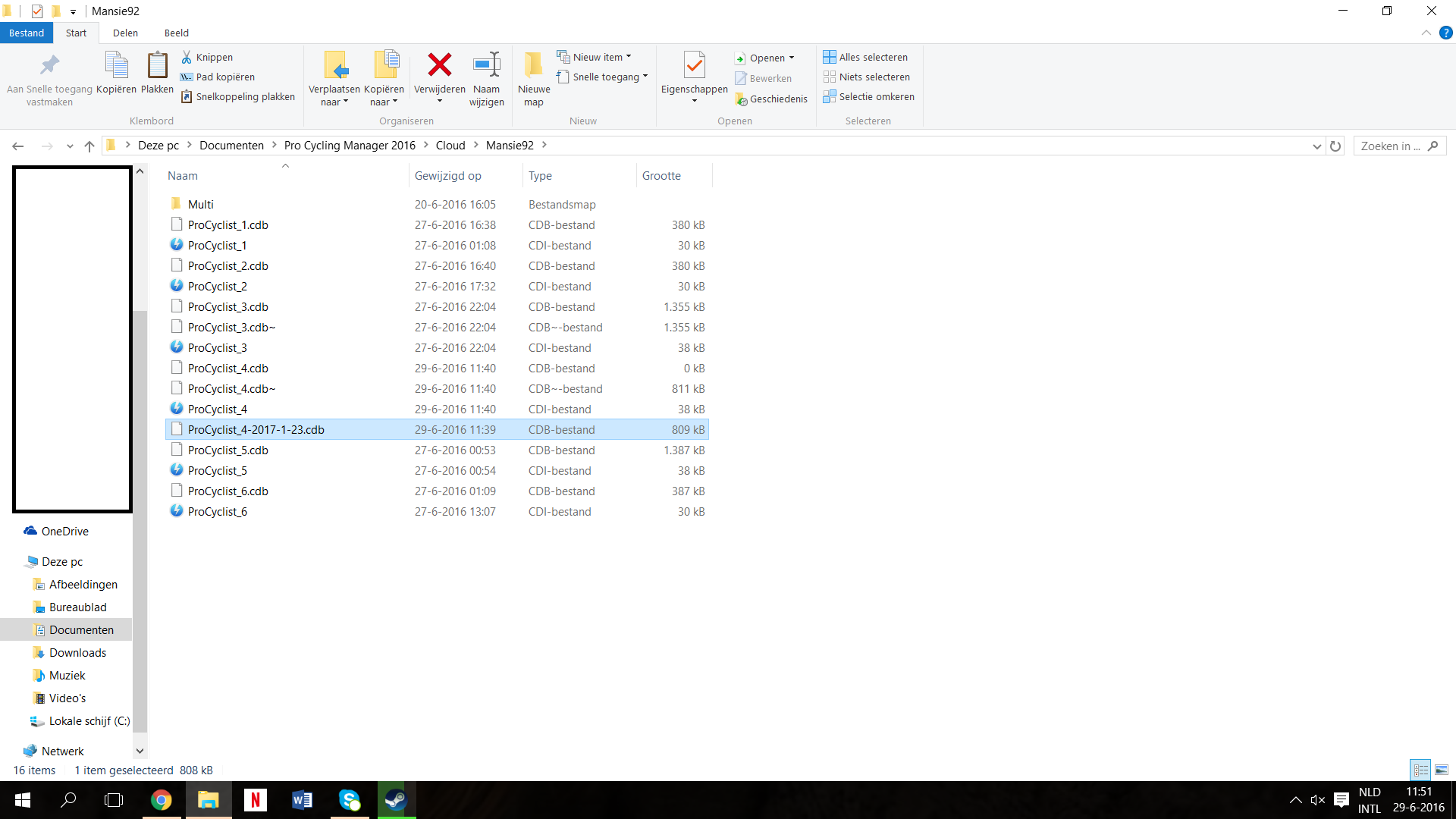
See the attachment. My pc is in Dutch, so the folders are named in Dutch as you see.
|
| |
|
|
| matt17br |
Posted on 29-06-2016 13:01
|
Directeur Sportif
Posts: 10519
Joined: 28-09-2013
PCM$: 200.00
|
That seems fine, now in theory you should go in game and click on load to load exactly that save. If it doesn't work and the game does crash, you should try deleting other savegames you don't need anymore and see what happens. Corrupted saves can in turn corrupt other saves.
|
| |
|
|
| Mansie92 |
Posted on 29-06-2016 13:03
|
Amateur
Posts: 10
Joined: 20-06-2016
PCM$: 200.00
|
You are my hero!!! It works! |
| |
|
|
| Mansie92 |
Posted on 29-07-2016 15:39
|
Amateur
Posts: 10
Joined: 20-06-2016
PCM$: 200.00
|
Well, your trick was working very well... Until the last update... The game crashed again today, but when I put one of my older savefiles back in the Steammap it's over: the game closes and the Cyanide-crash-box is popping up!
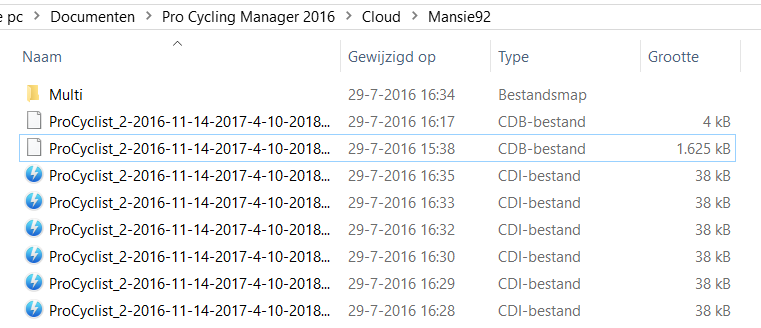
Edit: when the game crashes there are suddenly 7 files added back in the Cloudfolder... (See picture)
Any help?
|
| |
|
|
| matt17br |
Posted on 29-07-2016 16:41
|
Directeur Sportif
Posts: 10519
Joined: 28-09-2013
PCM$: 200.00
|
Probably something related to the update that makes the savegame not really compatible I'm afraid.
Do the same again, clear the cloud folder and copy the last weeklysave you got in there, then load it and see what happens. If it crashes again, I can't think of a solution.
|
| |
|
|
| Lachi |
Posted on 29-07-2016 18:06
|
Grand Tour Champion
Posts: 8360
Joined: 29-06-2007
PCM$: 200.00
|
Those files come from the steam cloud. Turn off Steam cloud synchronization for PCM 2016 in steam and then try again by copying from weeklysaves to cloud folder. |
| |
|
|
| Mansie92 |
Posted on 29-07-2016 19:53
|
Amateur
Posts: 10
Joined: 20-06-2016
PCM$: 200.00
|
Got it, when I upload the savegame in the cloudfolder when I'm ingame it suddenly works! |
| |
|