|
Insert disk 3
|
| Tubbe_Tubbe |
Posted on 04-07-2014 15:48
|

Under 23

Posts: 57
Joined: 17-05-2011
PCM$: 200.00
|
Sup
I bought the game, through the official site and i've already met a problem. When i try to run the first part, i get the message "insert disk 3, or choose the path where the file is" or something like that. Does that mean i have to download all of the parts, and the run the first part? Thank you |
| |
|
|
| Lachi |
Posted on 04-07-2014 16:01
|

Grand Tour Champion

Posts: 8360
Joined: 29-06-2007
PCM$: 200.00
|
Yes you have to download all parts (into the same location). I am pretty sure it tells you so in the e-mail. |
| |
|
|
| Tubbe_Tubbe |
Posted on 04-07-2014 16:08
|
Under 23
Posts: 57
Joined: 17-05-2011
PCM$: 200.00
|
I cant seem to find it in the email, but thank you. |
| |
|
|
| Tubbe_Tubbe |
Posted on 06-07-2014 13:54
|
Under 23
Posts: 57
Joined: 17-05-2011
PCM$: 200.00
|
Now i have all the parts, and placed every single file on my desktop, but it still tells me that, it cant find the file, even though i have selected "desktop" in the path. What to do?
And Lachi said that it tells me what to do in the email, but i am pretty sure, that i looked everywhere and cant find it. |
| |
|
|
| Ad Bot |
Posted on 28-10-2026 04:50
|
Bot Agent
Posts: Countless
Joined: 23.11.09
|
|
| IP: None |
|
|
| Lachi |
Posted on 06-07-2014 14:38
|
Grand Tour Champion
Posts: 8360
Joined: 29-06-2007
PCM$: 200.00
|
There was a good explanation in the last 5 games but they removed it now.
This is how you do it:
1. Download all 6 parts into the same folder (I recommend an empty folder)
2. Wait until all 6 files have been downloaded
3. Double click the EXE (the smallest file)
4. Follow the instructions on the installation dialog
But I am not sure if I understood your description. Where did you select the desktop? During the installation, you don't need to change anything (except you know what you are doing). |
| |
|
|
| Tubbe_Tubbe |
Posted on 06-07-2014 14:47
|
Under 23
Posts: 57
Joined: 17-05-2011
PCM$: 200.00
|
I downloaded every file, and placed them all in the same folder on my desktop. This is the message i get
https://gyazo.com/...86aae4bb81
 |
| |
|
|
| Lachi |
Posted on 06-07-2014 15:12
|
Grand Tour Champion
Posts: 8360
Joined: 29-06-2007
PCM$: 200.00
|
There must have been something wrong during the download and/or you renamed the downloaded files.
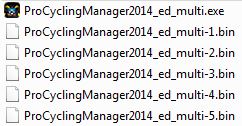
To prevent downloading them again, look at the image how the files should be named
And to prevent typing errors, copy and paste these:
ProCyclingManager2014_ed_multi.exe
ProCyclingManager2014_ed_multi-1.bin
Lachi attached the following image:
|
| |
|
|
| Tubbe_Tubbe |
Posted on 06-07-2014 15:55
|
Under 23
Posts: 57
Joined: 17-05-2011
PCM$: 200.00
|
I've done what you said, but i get the same message. |
| |
|
|
| Lachi |
Posted on 06-07-2014 16:15
|
Grand Tour Champion
Posts: 8360
Joined: 29-06-2007
PCM$: 200.00
|
So the files are in the same folder and they look exactly as on my picture?
How did you download the files, manually or with the download manager?
Download the first file again, maybe it was broken.
If nothing helps, then you should contact the official support. |
| |
|
|
| Tubbe_Tubbe |
Posted on 06-07-2014 16:19
|
Under 23
Posts: 57
Joined: 17-05-2011
PCM$: 200.00
|
Gonna contact the official support. Fucks sake
Thank you for your effort anyway |
| |
|
|
| sgdanny |
Posted on 07-07-2014 10:11
|

Classics Specialist

Posts: 3587
Joined: 18-03-2014
PCM$: 200.00
|
Got the same problem :/
|
| |
|